Your CFO asked for the AP/AR report. Claude built it in 90 seconds, straight from Odoo.
We built the Claude–Odoo connector your business has been waiting for. Ask in plain English. Get back finished spreadsheets, board-ready slides, and polished documents, drawn from your real Odoo data and assembled with Excel, Word, PowerPoint, Google Sheets, Docs, and Slides. Your team's superpower, available on Claude Code, Desktop, and Cowork.
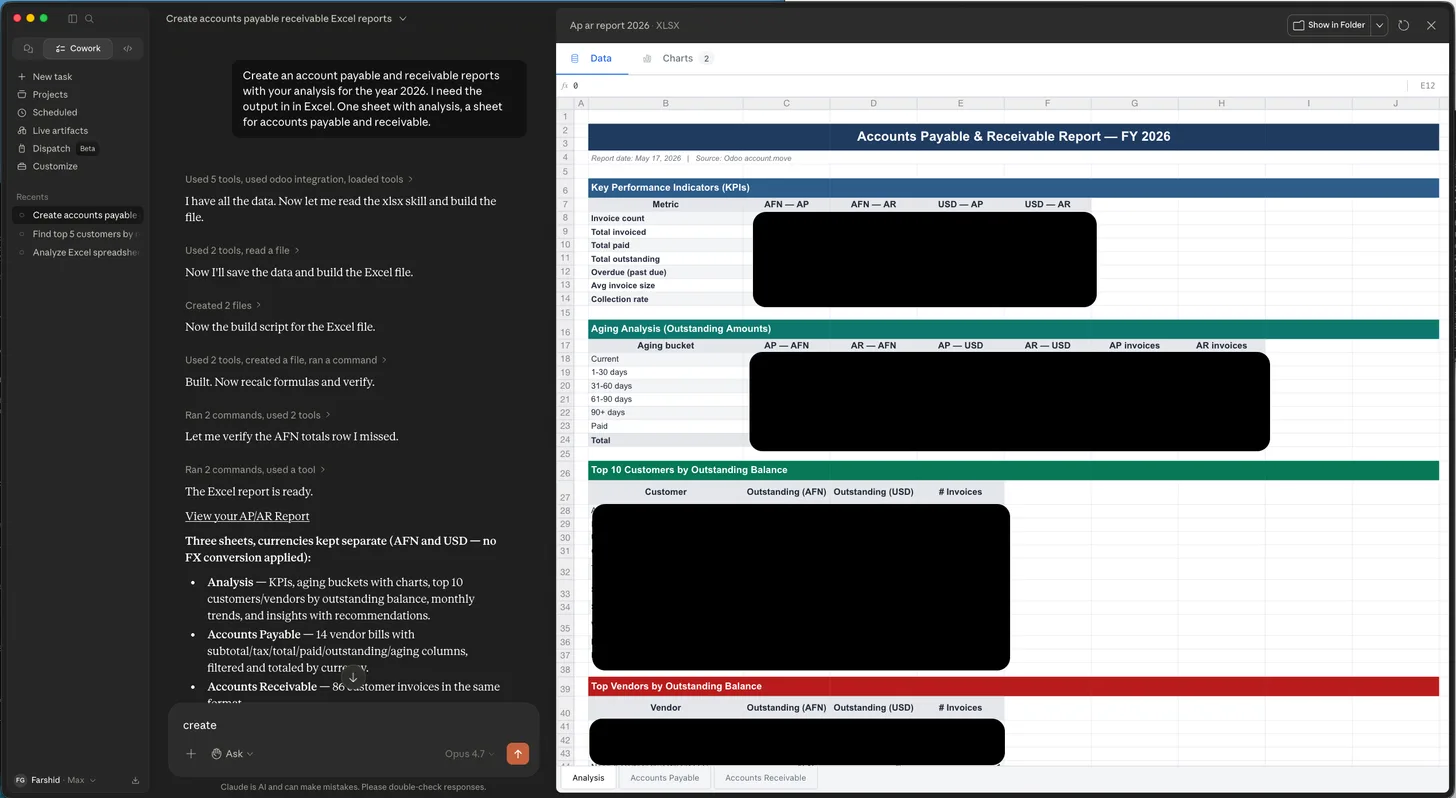
The 90-second AP/AR report
The screenshot at the top of this post is not a mockup. It is a real Claude session, mid-task, building a finished Accounts Payable & Receivable Report, FY 2026 straight from a live Odoo instance.
Multi-sheet Excel. Key performance indicators. Aging analysis. The top ten customers by outstanding balance. The biggest vendor exposures. Separate sheets for each currency so finance does not have to argue about FX conversions.
The prompt that produced it was a single English sentence:
"Create AP and AR aging reports with your analysis for the year 2026."
That is the whole interaction. No spreadsheets emailed back and forth. No SQL. No exports. No staff member sitting in Odoo for three days copying numbers into Excel. The CFO asked. Claude did the work. The Excel file landed on disk.
This is what the Claude–Odoo connector does. It lets your people ask your ERP questions in plain language and get back finished work, spreadsheets, documents, presentations, draft emails, even new records inside Odoo, built from data that was already yours.
We built it. We open-sourced it. And, as of last weekend, the whole team can use it safely.
What this means for your business
Every company running Odoo has the same problem: the data is in there, but the people who need answers can't get to it without help. The CEO wants a one-pager on this month's results. The sales director wants to know which accounts are stalling. The COO wants to know why a SKU went negative. The CFO wants the collections list before Friday.
Today, those questions go through somebody, an analyst, a controller, a developer, who knows where to click in Odoo and how to export to Excel. That bottleneck is expensive. It is also slow. And it is the reason most management teams operate on stale numbers.
The Claude–Odoo connector removes the middle step. The CEO asks Claude. Claude reads Odoo. Claude builds the artifact. The CEO reviews and sends it.
What each role gets
The same connector. Five very different superpowers.
The CEO
"Give me a one-page summary of last month's performance vs. last year. Revenue, margin, top customers, biggest deals lost. Build it as a Word doc I can read on the plane."
Claude pulls the numbers from Odoo, writes the narrative, formats a proper Word document with tables, and saves it. The CEO reads. The CEO does not have to ask anyone.
The CFO
"Build the AP/AR aging report for the year, with KPIs, top customers by outstanding balance, top vendors by exposure, and separate sheets for each currency."
That is the screenshot at the top of this post. A multi-sheet Excel workbook, ready for the audit committee, in about ninety seconds.
The Sales Director
"Take all open opportunities over $50K that have not been updated in three weeks. Build me a PowerPoint slide per account: account name, deal size, last touch, last note from the rep, and your recommendation on what to do next."
Claude reads the CRM, organizes by deal size, writes the recommendation per account, and exports a deck the director takes into the Monday pipeline review.
The Operations Manager
"SKU-1234 is showing negative on hand. Walk me through every stock movement, receipts, picks, scraps, transfers, in date order, and tell me what looks wrong."
Claude pulls the inventory movement history, sorts it, and produces a timeline narrative. The ops manager reads it in thirty seconds instead of opening seven Odoo screens.
The HR Manager
"For each department, build a Google Sheet with active headcount, the three positions we are hiring for, average tenure, and the names of employees whose contracts renew in the next sixty days."
Claude pulls from the HR module, organizes by department, writes the sheet to Google Drive, and shares the link. The HR manager opens it on her phone.
None of these are demos. They run today against live Odoo, through plain English.
Better together: Microsoft 365 and Google Workspace
The connector does not stop at Odoo. Claude already ships with native connectors for Microsoft 365 (Outlook, Word, Excel, PowerPoint, SharePoint, OneDrive) and Google Workspace (Gmail, Docs, Sheets, Slides, Drive, Calendar).
Plug those in alongside the Odoo connector and Claude becomes the assistant who can read your ERP and put the answer wherever your team already works.
A few combinations that show up immediately in real engagements:
- Odoo → PowerPoint. "Pull our top ten customers from Odoo and build a quarterly business review deck, one slide per customer with revenue trend, open deals, support ticket count, and a recommendation."
- Odoo → Excel. "Build the monthly close pack: P&L with prior-month comparison, balance sheet, cashflow waterfall, top variances called out in plain language."
- Odoo → Word. "Draft a polished board update, three pages, professional tone, this quarter's revenue, EBITDA, working capital, and the three risks I should know about."
- Odoo → Google Sheets. "Push the open accounts receivable list to a shared Google Sheet, add conditional formatting on aging buckets, share read-only with the collections team."
- Odoo → Outlook. "Draft a personalized email to every customer who has more than $5,000 overdue. Reference their specific invoice numbers, amounts, and due dates. Save them to my Drafts folder so I can review before sending."
- Odoo → Google Slides. "Build a quarterly investor update deck. Pull our sales numbers, gross margin, and customer count from Odoo. Use our brand colors. Share with the leadership group."
The Odoo connector supplies the data. Microsoft and Google supply the surfaces your people already use. Claude sits in the middle and does the assembly. Nothing leaves your control, Microsoft 365 stays in your tenant, Google Workspace stays in your domain, Odoo stays on your servers.
Automate it: Claude Cowork
Most of the prompts above are useful one time. The real productivity unlock is when you stop running them manually.
Claude Cowork is Anthropic's collaborative workspace for teams. With the Odoo connector added once, Cowork becomes the place where your business runs on a schedule:
- Every Monday at 7am, Claude builds the weekly executive dashboard, revenue vs. plan, top-five biggest deals, biggest customer issues, and drops it as a Word doc in a shared SharePoint folder.
- Every Friday at 4pm, Claude builds the AR aging report from Odoo and emails it to the controller along with one-line recommendations on which collection calls to make first.
- The first business day of each month, Claude generates the month-end close pack: trial balance, P&L, balance sheet, variance commentary, Excel workbook saved to the shared Drive, link posted to the finance channel.
- Every morning, the sales director gets a Google Sheet showing every opportunity that has not been touched in three weeks, with a draft re-engagement email for each one.
These are not science-fiction features. They are recurring prompts running in Cowork against connectors you set up once. The first time you build one, it feels surprising. The fifth time, it feels obvious.
How safe is this?
A reasonable concern. AI plus an ERP plus the whole team is the kind of sentence that makes IT leaders nervous. Three things worth knowing:
1. Your data stays on your infrastructure. The connector is self-hosted. It runs on a server you own. Claude talks to your server. Your server talks to your Odoo. NETLINKS never sees your data. We do not run a hosted service. We do not want to.
2. Each person uses their own Odoo identity. When you onboard a teammate, they go through a one-time consent screen where they enter their own Odoo email and API key. From that point on, every Claude action runs as them, under the same security groups, record rules, and permissions they already have in Odoo. If your sales rep cannot see HR records in Odoo, Claude cannot see HR records on her behalf either. The audit trail in Odoo shows the real person who triggered the change, not "bot user 42."
3. We had it independently audited. The connector went through a full third-party security review and came back with a strong posture rating. The findings and how we addressed them are documented publicly inside the repo.
In plain language: this is the kind of tool a CIO can deploy without losing sleep. It is exactly as powerful as the Odoo user it is acting on behalf of. Nothing more.
Where to install it
The connector works on all three Claude surfaces:
- Claude Code, for developers and power users who live in the terminal.
- Claude Desktop, for managers, analysts, and operators who want the connector in the same app they already chat with.
- Claude Cowork, for whole teams, with automations running on a schedule.
Installation takes minutes. The full step-by-step instructions, including which credentials to gather, what to set up in Odoo, and how to add the connector to each Claude client, live in the GitHub repo. We deliberately keep the install guide there so it stays in sync with the code.
→ github.com/NETLINKSAF/odoo-mcp, open source, MIT-licensed, free to install.
If you would rather we set it up for your team and build the first set of automations with you, that is exactly the kind of engagement NETLINKS is built for.
If you want the result without doing the setup
The connector is free. The hard part is not installing it. The hard part is knowing what to ask, which prompts move the needle for your business, where to draw the line on what Claude is allowed to change, and how to run the rollout so the team adopts it instead of ignoring it.
That is the conversation NETLINKS has been having with finance leaders, COOs, and CEOs for the last six months. We have been doing Odoo since 2012 and AI in production well before MCP existed. We can help you go from "interesting demo" to "Claude is running our Monday-morning dashboard, the Friday close pack, and our weekly collections list, and we got two analysts' worth of capacity back."
Talk to our team if that is the conversation you want to have.
Links
- Open-source repo + install guide: github.com/NETLINKSAF/odoo-mcp
- npm package:
@netlinksinc/odoo-mcp - Original announcement: We built the Odoo connector Anthropic didn't ship
The Claude–Odoo connector is built and maintained by NETLINKS Inc. MIT licensed. Free to use. No affiliation with Anthropic or Odoo S.A., "Claude", "Anthropic", "Odoo", and related marks belong to their respective owners.
Related reading: We built the Odoo connector Anthropic didn't ship · Lessons from ten agentic AI deployments · Real cost of enterprise AI · Odoo customization service