We built the Odoo connector Anthropic didn't ship, and open-sourced it
On May 13, 2026 Anthropic launched Claude for Small Business with connectors for QuickBooks, PayPal, HubSpot, Canva, Docusign, Google Workspace, and Microsoft 365, but no Odoo. Odoo runs finance, sales, HR, and operations for hundreds of thousands of SMBs worldwide. We built the connector. @netlinksinc/odoo-mcp is now on npm under MIT.
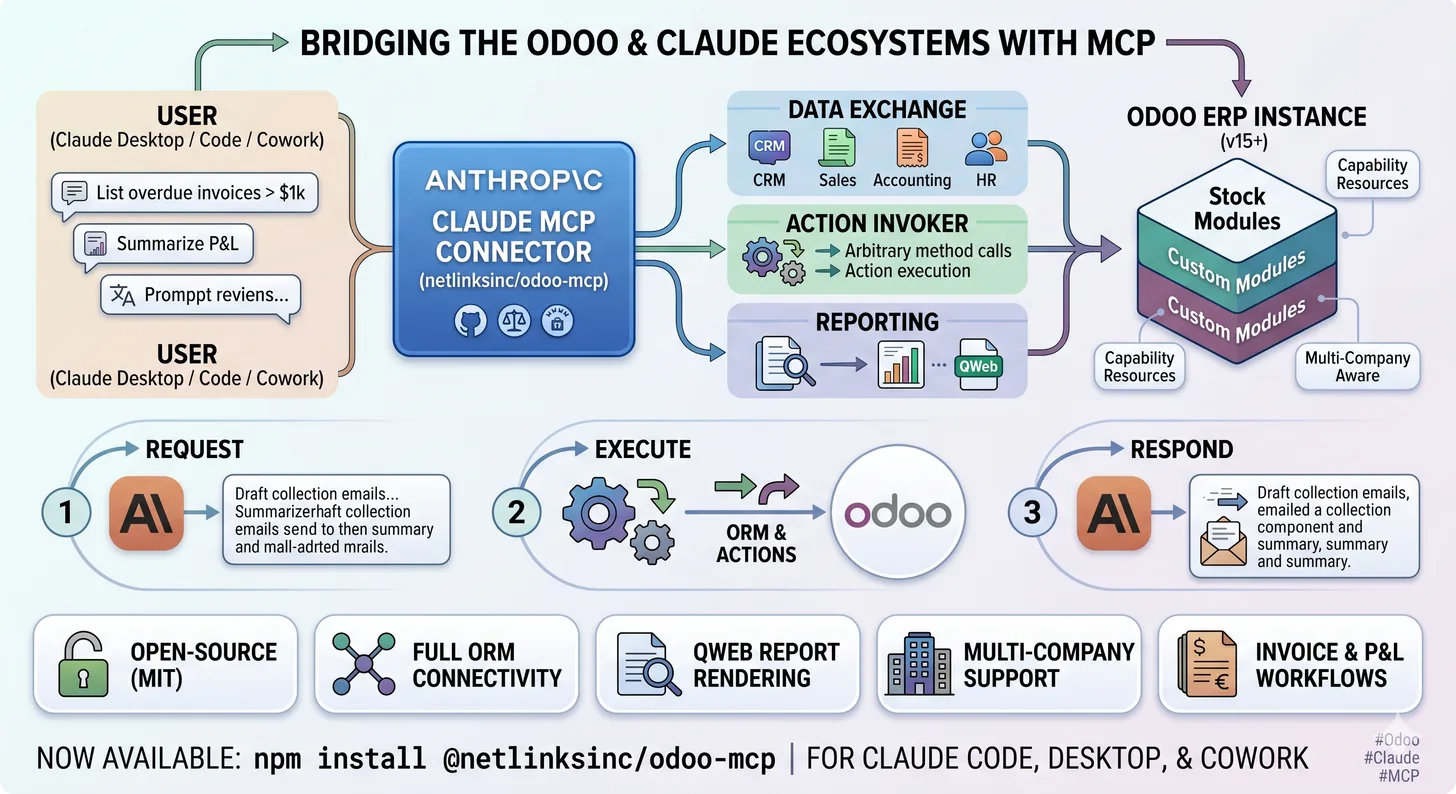
The gap nobody else filled
On May 13, 2026, Anthropic launched Claude for Small Business, a new SKU aimed at small and mid-sized companies, with native connectors for QuickBooks, PayPal, HubSpot, Canva, Docusign, Google Workspace, and Microsoft 365.
No Odoo.
That's a significant omission. Odoo runs finance, sales, HR, manufacturing, inventory, e-commerce, and operations for hundreds of thousands of SMBs worldwide, including most of the small and mid-market companies in Europe, the Middle East, and large parts of Asia and Africa. Any product called "AI for Small Business" that can't talk to Odoo is missing a large slice of the market it claims to serve.
So we built the connector.
Introducing @netlinksinc/odoo-mcp
@netlinksinc/odoo-mcp is an open-source (MIT-licensed) Model Context Protocol server that lets Claude work directly with any Odoo 15+ instance.
If you haven't seen MCP before: it's the open standard Anthropic released in late 2024 for connecting language models to external tools and data sources. An MCP server exposes a set of tools and resources; a Claude client (Claude Code, Claude Desktop, Claude Cowork) connects to it, discovers what's available, and can invoke it on behalf of the user.
What this means in practice for an Odoo customer: instead of switching between Claude and your ERP, your ERP becomes another surface Claude can read from and write to. Through natural language.
What's in v0.1.1
The current release ships two things: tools (which let Claude do things) and resources (which tell Claude what's possible in your specific Odoo instance).
Ten generic tools
We deliberately did not write a separate tool for every Odoo model. Odoo has tens of thousands of models once you count custom modules, wrapping each one would be both impossible to maintain and impossible for Claude to discover. Instead the connector exposes ten generic primitives that cover everything the Odoo ORM and RPC layer can do:
- search_read, query any model with domains, fields, limits, ordering
- read, fetch records by ID
- create / write / unlink, full CRUD against any model the user has access to
- execute_method, call any method on any model (Odoo's RPC
execute_kwsurfaced directly) - fields_get, introspect any model's schema, including computed fields, selections, and custom fields
- call_action, fire any Odoo action (server actions, scheduled actions, workflow transitions)
- run_report, render any QWeb report (invoices, sales orders, P&L, custom reports) as PDF
- search_count, fast counts without pulling rows
Ten tools is enough surface area to let Claude do anything a power user could do through Odoo's web interface or RPC API, and small enough that the model can actually reason about which one to use.
Seven capability resources
The harder problem is discoverability. Every Odoo instance is different. One client runs stock Accounting + Sales + Inventory. Another has 47 custom modules built over a decade. A third has third-party apps from the Odoo App Store mixed with internal modules.
A connector that only works against a fixed schema is useless in real life. So we shipped seven capability resources that Claude reads at session start:
- installed modules, what's actually installed (stock + custom + community)
- available models, every model Claude can address, including ones from custom modules that didn't exist when the connector was written
- available reports, every QWeb report registered in the instance
- available actions, every action Claude can trigger
- companies, the multi-company structure
- currencies, what currencies are configured and which is the company default
- server info, Odoo version, edition (Community/Enterprise), database name
The effect is that the connector adapts to your Odoo, not the other way around. A custom module shipped this morning is visible to Claude this afternoon with no code changes to the connector.
Things we cared about
A few design decisions worth calling out, because they shape what the connector is useful for.
Multi-company aware
Real Odoo customers run multi-company. A holding with three subsidiaries. A retail group with twenty stores as separate companies. A consultancy with operating entities in five countries.
The connector passes allowed_company_ids through every RPC call, exposes res.company as a first-class resource, and respects record rules. Claude can answer "summarize Q1 revenue across all three subsidiaries" without you having to switch context in Odoo. It can also answer "show me only entity X's P&L" without bleeding data across companies, because Odoo's own access controls do the enforcement.
Threat-modeled
The connector ships with a STRIDE threat model in the repo. We thought about the obvious attack surfaces, credential storage, prompt injection of Odoo data into Claude's context, action invocation outside the user's intent, before shipping, not after.
Two design choices fall out of that:
- No service account by default. The connector authenticates as the human user. Whatever Claude can do, the user could have done themselves through the Odoo UI. There's no superuser elevation hidden inside the connector.
- PII-redacting logs. When the connector logs RPC calls for debugging, it redacts known PII fields (email, phone, address, identification numbers) before they hit disk. The logs are useful for debugging without becoming a separate breach surface.
Stable across Odoo versions
We test against Odoo 15, 16, 17, 18, and 19. Odoo changes a lot version-to-version, fields move, methods get renamed, the ORM evolves. The connector deals with this by leaning on Odoo's stable RPC contract (XML-RPC and JSON-RPC) rather than internal Python APIs. If you can call it from xmlrpc.client today, it will keep working in Odoo 20 next year.
What it looks like in practice
A few examples from real testing:
Accounts receivable triage. "List overdue invoices over $1,000, grouped by customer. For each customer, draft a polite collection email referencing the specific invoices and amounts."
Claude calls search_read against account.move with the right domain, groups the results, then writes one email per customer. The emails are good, because Claude has the customer name, the invoice numbers, the amounts, and the due dates pulled directly from the ERP, not made up.
Month-end close summary. "Summarize this month's P&L versus last month, highlight the three largest variances by account, and tell me which ones look like they need investigation."
Claude calls run_report for the P&L QWeb report for both periods, reads the data, runs the comparison itself, and produces a one-page narrative.
Quote generation. "Create a quote for a new partner named Acme Corp in the manufacturing module with three line items: 100 units of Product X, 50 units of Product Y, both at 15% discount."
Claude creates the partner via create, then creates a sales order with the right lines, then returns the quote number and PDF.
None of these are demos. They're things Claude does correctly today against a live Odoo instance.
Why we open-sourced it
A reasonable question: NETLINKS is an Odoo consultancy. Why give the connector away instead of selling it?
The honest answer is that connectors are infrastructure, not product. Our business is Odoo expertise, implementation, customization, integration, multi-entity rollouts, complex manufacturing setups, training, ongoing support. None of that gets easier if we hide the wrench in the toolbox.
A widely adopted open-source connector is better for our customers, better for the Odoo ecosystem, and ultimately better for us than a proprietary one that nobody outside our client base ever touches. Tools that get used get hardened. Tools that sit behind a paywall get stale.
We're also realistic about the alternative. Anthropic will eventually ship an official Odoo connector, or Odoo itself will. When that happens, the only reason our version stays relevant is if it's already proven in production across many environments. The fastest path to that is open source.
Roadmap
The current release works with Claude Code, the CLI surface where developers and power users live, over the standard MCP stdio transport.
v0.2, shipping in the next few weeks, adds:
- Claude Desktop support via remote HTTP transport
- Claude Cowork support, so teams can share a single Odoo connection across the workspace
- OAuth-based authentication so end users don't need to handle API keys directly
- A managed hosted version, for customers who want the connector running without operating it themselves
The goal across v0.2 and v0.3 is simple: any Claude surface a small business uses, Code, Desktop, Cowork, Claude.ai web, should be able to reach their Odoo without engineering effort on the customer's side.
Install it
npm install -g @netlinksinc/odoo-mcp
Configuration is three environment variables: Odoo URL, database name, and user credentials. The repo has a complete walkthrough including how to register the server with Claude Code.
- Repo: github.com/farshidghyasi/odoo-mcp
- Issues, PRs, and case studies welcome. If you run into something the connector doesn't handle, open an issue and we'll triage it.
If you're an Odoo customer evaluating AI
The connector is free. If you want help wiring it into your actual workflows, drafting the prompts your operations team will use, building governance around what Claude is allowed to do, or running a structured pilot to measure whether AI in your ERP is moving real business metrics, that's the conversation NETLINKS is built for.
We've spent more than two decades doing Odoo work for clients across the US, Middle East, and Asia. AI in the ERP isn't a separate practice for us, it's the next chapter of what we already do.
Get in touch if that's the conversation you want to have.
Related reading: Real cost of Odoo implementation · Lessons from ten agentic AI deployments · Build vs buy AI agents · Odoo customization service